

Mobileways Gravity 2.70 build 7158 is one of the latest version of full featured native twitter / facebook client for symbian S60 devices. Gravity offers superb smooth UI over low end symbian devices with less memory consumption. Gravity v2.70 has its own awesome keyboard to make your things easy.
![[FULL] Gravity v2.70 Build 7158 S60v5 Belle Signed](https://blogger.googleusercontent.com/img/b/R29vZ2xl/AVvXsEg9yN5bOU9121c-rPlYTaXk5pSmFq1iaXJ5u8uMD5bGFfu7CjE12mT8BAObLyYd9i-Q1vOaJh9siMN6eepTYhBDnvWJegxchOpEO0xM8fRSM0Q3qjKdQnYs5kAe5L3Sp2Y2tdj_2_Kq31g/s1600/%5BFULL%5D+Gravity+v2.7+Build+7158+S60v5+Belle+Signed+1.jpg "[FULL] Gravity v2.70 Build 7158 S60v5 Belle Signed")
- Interface, speed, cosmetics, stability
The original demo app for what could be achieved with kinetic scrolling and a responsive UI, Gravity excels here.
Primarily a Twitter client, Facebook (and other) functionality does seem at times a bit of an afterthough. So context-sensitive tappable buttons aren't always where you'd think they'd be. Still, a good start and I'm looking forwards to the full release version.
UI works in 'dark' or 'light' themes.
- Status messages/news feed
Fonts are great too (I use View | Large fonts).
There's no filtering, but it's hard to fault such a sumptuous timeline experience.
- Facebook email
Very nicely integrated and presented.
- Photo browsing
Also you can't swipe between photos - you have to keep going 'Back' and then tapping the next one.
Interestingly, if you tap through to 'Album' from a photo posted to a friend's timeline, you can view just related photos. It does seem as if some logical links and UI flow have not yet been implemented in this 'preview' edition.
![[FULL] Gravity v2.70 Build 7158 S60v5 Belle Signed](https://blogger.googleusercontent.com/img/b/R29vZ2xl/AVvXsEiFGrp_pImJ-aeeJiZdYnq6pSis17hzGep2f10wVxYC1PCviRAWlWaWQYYcT0WMmXdG5bRdvznlL22p2KnjeyfvI839q0IzcxD6AHbNT1j1b0txE_HC5th0ShooxkGHbxTVpwa4mIfMAVk/s1600/%5BFULL%5D+Gravity+v2.7+Build+7158+S60v5+Belle+Signed+2.jpg "[FULL] Gravity v2.70 Build 7158 S60v5 Belle Signed")
- Media sharing / upload
This is fine and works very well - thankfully images get scaled down by default, to save bandwidth. After all, Facebook then resamples them down hugely, so there's no point in uploading full 12mp photos!
Thumbnail building does take a few seconds but is rarely a problem.
- Other features (Groups, Tags, etc.)
Most of all, Gravity stands out by also offering stellar Twitter support, plus Google Reader, Foursquare and others.
When Gravity hits a release verison of 2.0 and with the remaining Facebook logical links in place, it'll be a contender for the top spot.
A truly remarkable piece of software.
Download FULL Gravity version 2.70 Build 7158 Signed
Update 21 July 2012:
Gravity v2.70 Build 7168
Changelog :
- Fixed some random crashes in s60v5 (on empty tabs)
- Some other bug fixes.
Installation Trick (Need to follow to get the full version of Gravity 2.70 build 7158)
1. Install 2 file from archive (retail v1.32.6603.sis and v2.70.7158.sisx [Choose latest one])
2. Opened the retail v1.32 and login if done exit
3. Opened the original file v2.70.7158 and login again.
4. Enjoy..!!!!
Important : Always give credit to those who trusted on you !!!

Twitter for Nokia S40
Twitter today announced via their blog that Nokia’s S40 series will get their own official Twitter client. The app is already available via the Nokia Store, and comes with the usual price tag of free. Twitter for S40 is actually a refined client for their mobile site, which should enable Twitter fanatics to tweet more efficiently with their S40 device.
Here’s the post from Twitter’s official blog:
Nokia, the most widely used mobile platform in the world, now offers a fast, native Twitter experience for Series 40 feature phones. Beginning today, millions of people who use Nokia Series 40 devices can download Twitter for Nokia in the Nokia Store.
If you have a Nokia S40 device, you can sign up for Twitter directly from your phone, read Tweets from all of the accounts you follow, connect with others, and more. Download Twitter for Nokia now in the Nokia Store to discover one of the richest experiences available on your device.
Note: Other download link will be updated soon.
 This is a great app for Nokia smartphones, a app which is very much similar to the app which is available for the Android smartphones. A powerful social networking integration like HTC. A new version of one of the most popular social networking
application Socially for Symbian mobiles has been released with improved
features. If you are not aware of what Socially is all about, then here
is little :
This is a great app for Nokia smartphones, a app which is very much similar to the app which is available for the Android smartphones. A powerful social networking integration like HTC. A new version of one of the most popular social networking
application Socially for Symbian mobiles has been released with improved
features. If you are not aware of what Socially is all about, then here
is little :Description :
Socially is a must-have social networking client for your Nokia Symbian mobile, allowing full access to sites like Facebook, Twitter, LinkedIn and Foursquare from one place.
Enrich your Nokia Phone :
- Sync friend’s profile photos with Phone Contacts
- Add Facebook Birthdays or Events to Phone Calendar
- Receive social updates from these sites as Push Notifications and much more.
- And also post, tweet, reply, comment, search, check-in and everything else!
What’s new :
- Linked Contacts: There is a new and improved wizard for (predictive) linking of Phonebook Contacts to Social Contacts, available from the application home screen.
- Twitter: Support for Favorite tweets, support for Lists, save your Search queries and see saved searches, see what’s latest Trend on Twitter, see your friend’s followers and whom your friends are following.
- Foursquare: View your History on Foursquare, add new Places on Foursquare, add Tips to a Place.
Socially utilizes the rich data emerging from your favourite social networks to enrich your phone’s Address Book, Calendar, CallerID, Idle screen and much more. You phone is no more just a phone but a social networking device to connect you to rest of the world. Enjoy Socially!
The application is compatible to work with Nokia 5800 XpressMusic, 5530 XpressMusic, N97, N97 Mini, X6, N8, C6, C7, 5250, 5230, 5233 and 5235 smartphones.
Download Socially 3.10
All New Facebook Experience with Facinate 1.01(629)....!!!
Facinate is a free facebook client for symbian s60v5 & symbian belle devices. You can do everything with facebook with the help of Facinate. Along with some the additional features like :
- Has a unique swipable user interface. Superb..!!!
- Facebook chat...24/7*365 with no lag at all...:)
- Home screen - Cool homescreen notifications..
- Notifications - On your homscreen..!!! Never miss a single notification with facinate v1.01(629) ... :)
+1.jpg "Facinate For Nokia - Updated to v 1.01 (629)")
+2.jpg "Facinate For Nokia - Updated to v 1.01 (629)")
Updated version Facinate v1.01(629) changelog :
- Some lags removed.
- Less battery consumption.
- Better user interface in widget.
Also available on Nokia Store.
Note : Before using facinate_without_installer you must install " InAppAnalytics "
Downloads :

Change Log :
New beta version release with improved support for languages, and a number of error corrections based on user feedback:
- Calendar support for daylight savings is complete and functional
- Improved User interface and better UI Performance in terms of responsiveness
- Ability to attach and download files to the device file system "Received Files"
- An improved rendering capability for extended text format.
- Memory leaks are fixed and hence now the application will not get stuck anymore and continue to sync according to the set sync options.
- The application is compatible with Microsoft Office 365 Mobility Service (i.e only synchronization of email, contacts and calendar and support for remote contacts look up)
- A number of improvements and bug fixes are incorporated in this release.
- We are now supporting 21 languages in todays update.
NOTE: This beta software requires a firmware of 14.53 or above.
Quick Links
 |
| Nokia Asha 303 Firmware Updated To Version 14.60 |
Nokia also released another new firmware today for Nokia Asha family, with the Nokia Asha 303 getting updated from the previous version 14.38 to version 14.60. Changes include the following:
Nokia Asha 303 Updated Firmware Changelog :
New version of the web browser
Can now unsubscribe from the Tips and Offers service
Usability and performance improvements
Note : The availability of software update are region specific, if you don't have it already it should be available soon.
 |
| Nokia Asha 302 Firmware Updated to v14.53 |
The Nokia Asha 302 just got updated to version 14.53, up from the previous version of 14.26. Updated software version includes features of a new browser, usability improvements and the usual performance improvements. In order to update the software, fire up the Device Manager by typing *#0000#. Another option is to plug your Asha 302 into a computer and using Nokia Suite. We recommend you to backup all your personal data before updating the firmware.
Changelog v14.53 :
New version of the web browser
Usability improvements
Performance improvements
Note : The availability of software update are region specific, if you don't have it already it should be available soon.

Nokia is preparing to push out the Windows Phone 7.5 Refresh, aka Tango, update to the Lumia 710. OS version 8773 can already be found over at Navifirm with a large selection of builds for different operators and countries. There are two builds found on Navifirm: 1600.3030.8773.12120 / 1600.3031.8773.12121. 8773 indicates the OS version, ie WP 7.5 Refresh, and 12120/12121 indicates the firmware build. This many different builds on Navifirm could only mean that a worldwide rollout can be expected soon.
Countries listed:
Austria
Belgium
Denmark
Estonia
Finland
Germany
Hungary
India
Indonesia
Malaysia
Norway
Netherlands
Poland
Singapore
Spain
Sweden
South Africa
Switzerland
Thailand
Vietnam
Operators:
Mobileone Singapore
MTN ZA
SingTel Singapore
StarHub Singapore
Telenor DK
Vodafone IT
Vodafone Spain
Vodafone UK
FreeTel Korea
Polkomtel PL
Swisscom CH
T-Mobile UK
Vodafone Portugal
Keep tuned for more upddates :)
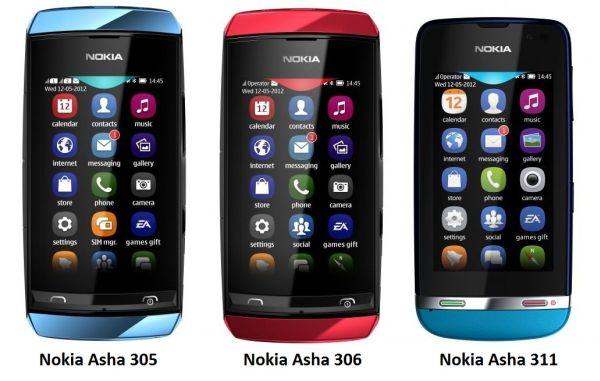
Nokia Asha 305 306 311
Nokia just announced the new Asha Touch family of devices, bringing touchscreen and the Nokia Browser 2.0 to very low price points. The three phones announced today were the Nokia Asha 305, Nokia Asha 306 and Nokia Asha 311.
The Nokia Asha 311 comes with a 3-inch scratch resistant capacitive screen (!) with polarization filters, a 3.2 megapixel camera, 1GHz processor, together with pre-installed Nokia Maps, Angry Birds, WhatsApp, and more. Nokia expects to ship this in the third quarter with an estimated retail price of EUR 92.
The Nokia Asha 305 is a dual SIM phone with a 3-inch resistive display and a 2-megapixel camera. This is expected to ship in the second quarter for a low price of EUR 63.
The Nokia Asha 306 is roughly the same as the Asha 305, with the addition of WiFi connectivity. We should see this shipping in the third quarter for the price of EUR 68.
Hit View Post to see introduction videos of the new Ashas.
Nokia Asha 311 :
Nokia Asha 305 & 306 :

Keep track of time with latest Cuckoo v2.0. Turn your mobile phone into grandfather clock or electronic desk clock or even you can use it as a wristwatch too.
There you will get several sound options & Cuckoo 2.00 will chime every hour, you will always stay on track. You can choose operation hours from the settings too. Cuckoo 2.00 is an which works from the background & provide you auto start feature and will not bother you if you don't want it. Enjoy..!!!
.jpg "Belle Shell Has Been Updated To Belle Shell v1.05")
.jpg "Belle Shell Has Been Updated To Belle Shell v1.05")
Belle Shell 1.05 Update Changelog:
1. All widgets, the home screens and the gird menu items are rewritten in C++ to use less memory. This translates to about 5-10 MB less RAM used. Unfortunately, to get the RAM usage really low (no
more than 10 MB), all the QML code must be rewritten in C++, which will take more time.
2. When the program is started for the first time (or for the first time after the upgrade), all application icons are cached for better load times later. So, the first start up is really long (it may take up to 5 minutes if there are a lot of applications). However, after that the start-up time should be a little bit faster than before.
3. The default (and minimal) number of home screens is 2 instead of 3.
4. The gird menu is changed from 3x4 icons to 4x5 icons to be more modern and to show more apps per screen.
5. Custom wallpapers can be used. They are shown after the built-in wallpapers and must be 640x640 pixels in size. To see your custom wallpapers in Belle Shell, they must be placed in one of the following folders: C:\Data\Images\Backgrounds (C:\Images\Wallpapers in Symbian built-in File manager)
E:\Images\Backgrounds (E:\Images\Wallpapers in Symbian built-in File manager)
F:\Images\Backgrounds (F:\Images\Wallpapers in Symbian built-in File manager)
Please note that the built-in Symbian file manager shows these folders a little bit different as shown above.
6. There is new type of wallpapers: panoramic wallpapers. When you select the "Change wallpaper" command, you will see "Panoramic" as the last option. The panoramic wallpapers should be with size 1240x640 pixels (narrower may also work but not that good).
There are 5 built-in panoramic wallpapers and you can add your own in the following
folders:
C:\Data\Images\Backgrounds\Widescreen (C:\Images\Wallpapers\Widescreen in Symbian built-in File manager)
E:\Images\Backgrounds \Widescreen (E:\Images\Wallpapers\Widescreen in Symbian built-in File manager)
F:\Images\Backgrounds\Widescreen (F:\Images \Wallpapers\Widescreen in Symbian built-in File manager)
Please note that the built- in Symbian file manager shows these folders a little bit different as shown above.
7. The hardware keys (the menu key and the end key) can be captured by Belle Shell. By default in a new Belle Shell installation they are not captured. To turn them on, go to the homescreen menu -> settings and
turn on the option "Capture hardware keys".
8. If the hardware keys are captured the long press of the menu key by default shows the default Symbian task manager. If you prefer another task manager, you must set it in the home screen menu -> settings. Tap the button bellow the "Task manager:" label and you will see a list of all installed programs. Select the custom task manager and it will be shown when the menu key is long pressed.
Please note that most custom task managers also try to capture the menu key.
To avoid problems, it is best to change the settings of the task manager not to capture the menu key and leave that to Belle Shell. Otherwise the behavior is unpredictable.
 |  |
This application is developed to give you Windows Phone Experience on your Symbian smartphone only by install one simple application. This application is based on Flash Lite.
Windows phone emulator 2.1.4 is still in beta version so I need your feedback to make this app better. Windows Phone Emulator is emulator for Symbian smartphones to feel windows phone amazing tile UI to symbian. This apps inspired from Windows Phone UI on Nokia Lumia Smartphones. Try now and give feedback !
- Tiles UI
- Scrollable homescreen
- Battery and Signals indicators
- Dialer
New Release Note v2.1.4 :
- All Hub now with panoramic view
- Swipe to switch to home and menu
- New calendar icon
- New people icon
- Smoother
- New Animations
- New Menu
- Size reduced up to 60%
- Better RAM Management
- New Icon
Release Note v1.0.2 :
- "About" now with panoramic view
- Higher fps
- New Splash screen
- New look tiles
- Hidden-able battery and signal indicator
- Some minor changes


